
Business-process orchestrator
One engine for your site, your sales and the work behind them
A site, a shop, a catalogue and a back office on one engine, with AI agents that do the routine and people who approve the result.
AI agents
Agents do the routine. A person approves.
An agent in MMAIS is a step in a workflow you can read, not a black box. It researches, drafts and prepares; nothing is published or sent to a customer until someone says yes.
01
Articles from a brief
Give a topic and an audience: the agent writes a draft in your blog, the editor reads it, fixes it and publishes. Drafts never go live on their own.
02
Replies and reminders
An enquiry gets a first reply in the visitor’s language within a minute; unpaid orders get a polite reminder with the payment details; buyers are asked for a review a few days after a paid order.
03
A report you will read
Every Monday the owner gets what the agents did last week: runs, time saved and what it is worth at your rate. A week with nothing counted sends nothing.
An article, step by step
1. A brief
A topic, an audience and a category go into the workflow, by hand or from a form, a schedule or another workflow.
2. A draft, not a post
The workflow writes the article into your blog as a draft. In the demo the whole run takes a fraction of a second and logs every step.
3. An editor decides
The draft waits in the blog list with its own status. The editor opens it, changes what needs changing and presses Publish, or deletes it.
The result of a run: the article sits under Drafts with a draft badge until an editor publishes it.
Ready-made scenarios in the panel.
Scenarios ready to switch on
Lead replies, payment reminders, review requests and the Monday report come as scenarios: switch one on, see an example, fine-tune it later in the editor. Each card says what it needs to run.
Workflows
Automation you can see and change
Every automation is a diagram: what starts it, what it checks, who decides, what it does. You open it, read it left to right and change a step without writing code.
The workflow editor: the canvas in the middle, settings on the left, the library of steps, components, agents and models on the right.
More than forty kinds of step
Triggers, conditions, routing, waiting, parallel branches, AI decisions, agent skills, and actions in your shop, blog, catalogue, mail and analytics.
Started by what happens
A form on the site, a new order, a support ticket, a schedule, or another workflow. One workflow can call another.
A person in the loop
An approval step stops the run and waits. The request shows exactly what will be sent or changed; approve, edit or refuse.
Test runs that touch nothing
A test run goes through every step but does not charge a card or write to your CRM: payment and CRM steps are simulated and marked so.
A log that says why
Each run keeps its steps and outcome, and the editor lists the latest runs beside the diagram. When a run stops, the list names the reason, not just the fact.
After a test run: every step on the canvas is marked done with its time, and Recent runs on the left keeps the run with its log.
The pipelines library.
Start from a blueprint
Order risk check, support ticket triage, a weekly audit of your own site: install in one click, then adjust. Each blueprint shows its steps and how many model calls a run costs before you install it.
NovaBuilder
Every page is yours to edit
The site you see is not a fixed template. Pages, article and product templates, the header and the footer are built from blocks in NovaBuilder and edited in the panel.
Blocks, not code
Sections, grids, text, images, buttons, product and article lists, forms, maps and animated hero scenes. Drag, set, publish.
Draft first
Changes are saved as a draft and go live when you publish. Earlier versions of a page are kept.
Light and dark, one palette
A theme sets colours, fonts and shapes for the whole site and every module; desktop, tablet and phone views in the editor.
An article in the constructor: widgets on the left, the page as visitors will see it on the right.
In the product
More of what is inside
Screens from the live demos and the panel. Click one to see it full size.
Sign in your way
A crypto wallet through Sign-In with Ethereum (MetaMask, WalletConnect), Google, Apple, a code by e-mail or a password. Each method is an extension you switch on.
One cabinet for the customer
Purchases, sales, returns, invoices, B2B orders, finances, delivery, subscriptions, downloads, affiliate links and a seller’s own store: tabs that follow your modules.
Support that hands over
An AI assistant answers visitors in their language; when it cannot help, the visitor leaves a request with the conversation attached and a person takes it over in the support inbox.
A shop out of the box
Catalogue with categories and sorting, prices with VAT, cart, product comparison and B2B bulk orders.
Product pages that sell
Gallery, variants, stock, reviews and related products, with structured data for search engines.
A catalogue on a map
Companies with verified and featured badges, categories, distance and near-me search on an open map.
Articles you design
Every article is a page: cover, sections and related posts, edited visually and published when ready.
A free marketing snapshot
Visitors check a site’s speed, SEO, security headers and mail records and leave their contact: a lead magnet that ships with the platform.
Modules
Switch on what you need
One installation, many modules. Each is switched on in the panel and brings its pages, its settings, its customer-account tab and its workflow steps.
Shop
Sell anything
Physical and digital goods, subscriptions, courses and services; one brand or many sellers; five currencies, EU VAT, shipping zones, promo codes, invoices.
Catalogue
Companies and reviews
Company pages with price lists, opening hours, a map, a QR code, verified badges, moderated reviews and enquiries.
Content
Blog and pages
Articles with categories and scheduled publishing, landing pages, your own content types, SEO fields, share cards and a sitemap.
Customer account
One cabinet for the customer
Orders, invoices, downloads, subscriptions, reports and messages in one account whose tabs follow the modules you switched on.
Analytics
Know what works
First-party page-view statistics, and a marketing snapshot that audits a site’s speed, SEO, security headers and mail records.
Languages
Eleven out of the box
Site and panel in English, Bulgarian, German, Spanish, French, Italian, Polish, Portuguese, Russian, Turkish and Ukrainian.
Built to order
Your process, not ours
Most businesses fit the modules as they are in some places and not at all in others. We start with a call, write down what fits, what needs settings and what has to be built, and build that part: a module, a workflow, an integration, a report.
A fit-gap before a price
You get a list: works out of the box, needs configuration, needs development. The estimate follows the list.
Under your brand
Your domain, your logo, your theme, your admin address. Customers see your product.
Start small
Begin with a site or a catalogue that takes enquiries; add the shop, the agents and the back office when each has proved itself.
Under the hood
A current stack on your own server
MMAIS is built on Next.js 16 and React 19 with PostgreSQL 16, Drizzle and Auth.js. It runs as an ordinary service on a server you control; your data stays in your database.
Access under control
Roles and per-section rights for staff, view-only roles, an admin address you choose, sign-in throttling, and approvals for anything that leaves the system.
Room to grow
Modules are switched on as you need them; public pages can be served by several processes behind a load balancer; the database can be given a read replica; scheduled work runs outside page requests.
Updates without surprises
Each release is tested against a real PostgreSQL before it ships, and an update keeps your content, settings and uploads.
Measured, not promised
How far one server goes
We loaded a production build of MMAIS with the demo shop and measured it: one process on four virtual cores with 1 GB of memory, PostgreSQL 16 beside it, and mixed traffic of home page, store, product pages and search.
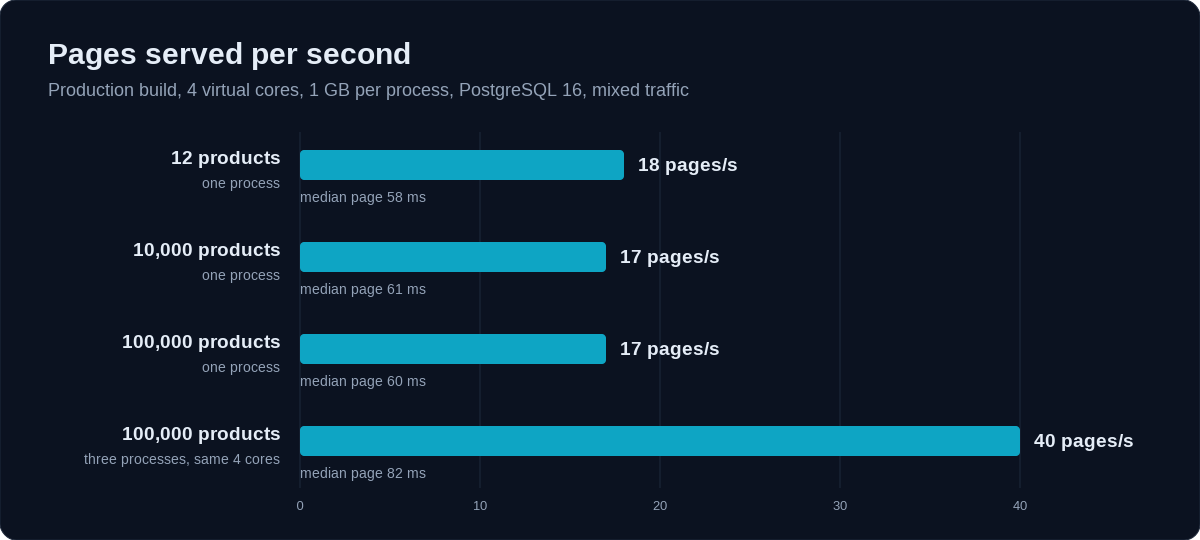
Measured pages per second for four set-ups. The catalogue grows ten thousand times; the speed of a page does not change. More processes on the same cores serve more pages.
100,000 products
As fast as twelve
A product page takes about 60 ms with 12 products and with 100,000. The database stays at about a fifth of its capacity.
About 17 pages a second
From one process
Roughly a million and a half page views a day if spread evenly, and no errors at a hundred simultaneous connections.
2.3 times more
Add processes, add pages
Three processes behind a load balancer on the same four cores served 40 pages a second. More cores and processes serve more pages.
A synthetic test run on 16 November 2026 on our hardware with the shop demo data. Your numbers depend on the server, the pages and the modules you use; we repeat the test on your build on request.
Moving in
Bring your data from the old system
Changing engines usually stalls on the data. Our migration tool, i2b, reads an export of your current database, shows what will move, what will change and what is at risk before a single row is written, and moves it once you agree.
Analysis first
Tables, links between them and data quality are shown as a map; nothing is written during analysis.
A dry run by default
The move is rehearsed and reported before it is real, so the first real run holds no surprises.
Connected to MMAIS
The i2b module links a migration project to your MMAIS, so workflows can read its progress and results.
Everything in MMAIS
The full list
What a standard installation includes today, by area. Modules are switched on and off in the panel; anything not on this list is built to order.
Site and content
✓ Pages, landing pages and your own content types
✓ Blog with categories, authors and scheduled publishing
✓ Drafts and version history for every entry
✓ Page templates for articles, products, archives and 404
✓ Site search across pages, articles, products and companies
✓ Contact forms with saved submissions and topics
✓ Media library for images, video and audio
NovaBuilder and design
✓ Visual editor for every page, header and footer
✓ Library of blocks and widgets, including module widgets
✓ Theme packages and a theme builder
✓ Light and dark mode on one palette
✓ Menu editor for header and footer menus
✓ Responsive settings for tablet and phone
Shop
✓ Physical and digital goods, subscriptions, courses, services and NFT items
✓ One brand or many sellers with their own catalogues and payouts
✓ Five currencies with live or manual rates
✓ EU VAT with gross or net prices, shipping zones, promo codes
✓ Cart, wishlist, product comparison, B2B bulk orders and order tracking
✓ Invoices, returns, downloads and affiliate links
✓ Card payments through Stripe; bank transfer with reminders
Customer account
✓ One cabinet whose tabs follow the modules you switch on
✓ Orders, invoices, payments, subscriptions and downloads
✓ Marketing reports and monitored domains
✓ Seller tools: sales, customers, finances, delivery, own store
✓ E-mail preferences and data export
Directory, reviews and community
✓ Company pages with price lists, hours, map and QR code
✓ Map search, near-me search, verified and featured listings
✓ Enquiries to companies with consent
✓ Moderated reviews and ratings
✓ Petitions, polls with a printable protocol, communities
✓ Community forum with boards, topics and moderation
AI agents and workflows
✓ Visual workflow editor with more than forty kinds of step
✓ Ready-made scenarios: lead replies, payment reminders, review requests, a Monday report
✓ Pipelines library with one-click blueprints
✓ Approval steps and an approvals inbox
✓ Agent skills, a catalogue of approved steps and a run log per step
✓ Scheduled runs, event triggers and workflows calling workflows
AI models and assistants
✓ AI gateway for cloud models with your own keys
✓ Local models on your own hardware, with a playground
✓ Published assistants and a site chatbot with human handover
✓ AI avatars with their own voice and rules
✓ MCP: connect external tools, and MMAIS as an MCP server
✓ AI privacy settings for what may leave the server
SEO, analytics and mail
✓ SEO fields, share cards, structured data and canonical addresses
✓ Sitemap and robots.txt managed from the panel; page redirects
✓ First-party page-view analytics and Google Analytics 4
✓ Marketing snapshot: speed, SEO, security headers, DNS and mail records
✓ Outgoing mail with templates, subscribers, consent and unsubscribe
✓ Support tickets from the site
Platform and security
✓ Eleven languages for the site and the panel, with a translations editor
✓ Users, roles and per-section rights, including view-only roles
✓ Sign-in by e-mail and password, e-mail code, Google, Apple or a crypto wallet
✓ Admin address of your choice and sign-in throttling
✓ Editions and licences per domain, updates that keep your data
✓ Data migration from old systems with i2b
In development and available on request: classifieds, HR and careers, a learning academy, and ERP and CRM. Tell us what you need and we will say when and how.
See it on your case
Tell us what you sell and how you work. We will show the modules that fit on a live build and say plainly what would need to be built.